Scenarios
Create, compare, and publish what-if scheduling scenarios for resource planning.
Overview
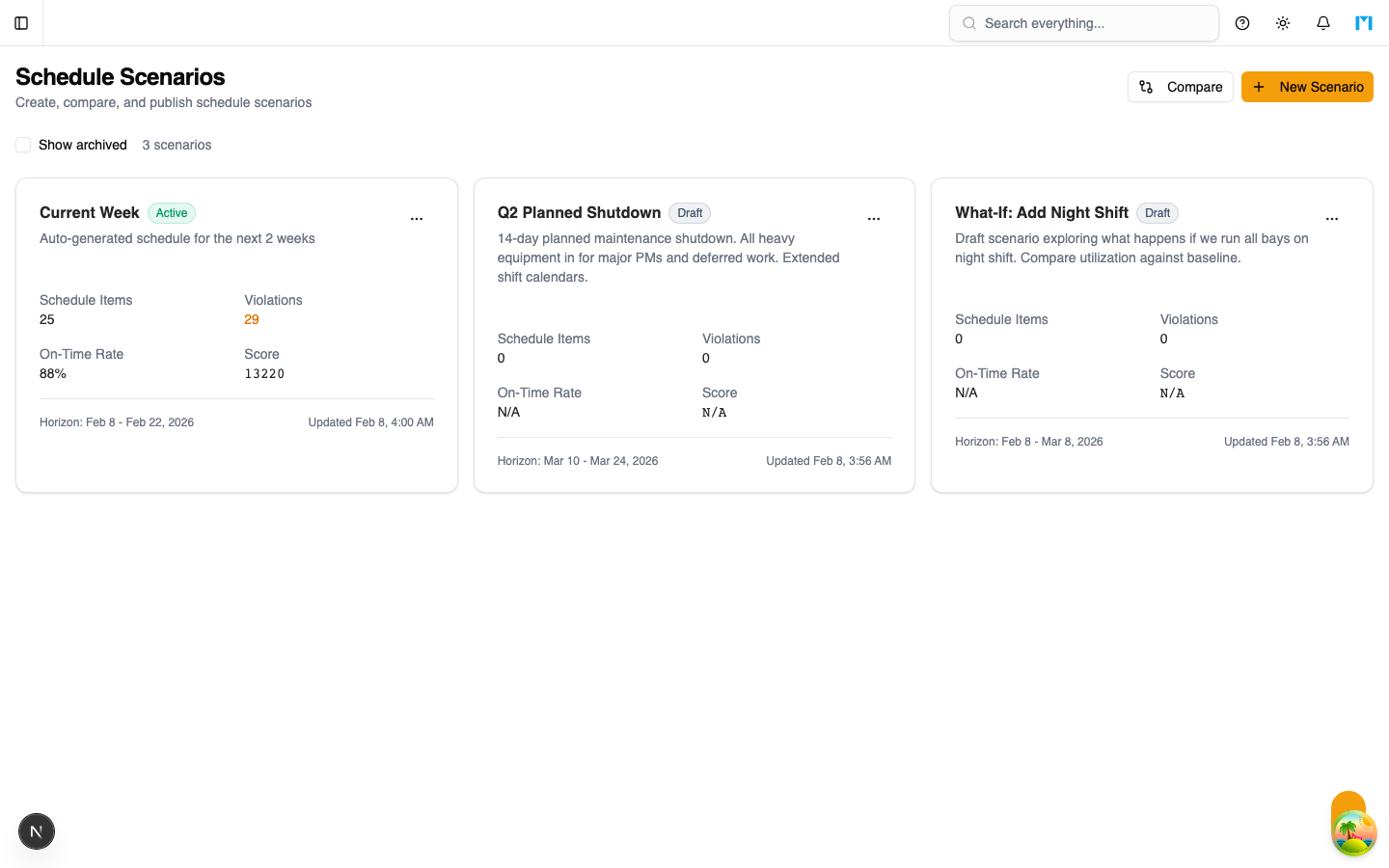
Scenarios are the foundation of the Scheduler. Each scenario is a self-contained schedule plan with a defined planning horizon, a set of task assignments, and computed KPI scores. You can create multiple scenarios to explore different scheduling strategies before publishing the best one.
Key Concepts
Scenario Lifecycle
Scenarios move through three statuses:
| Status | Description |
|---|---|
| Draft | Initial state. Can be edited, optimized, and deleted. |
| Active | The live schedule. Only one scenario can be Active at a time. |
| Archived | Stored for reference. Cannot be optimized or deleted while archived. |
When you publish (activate) a scenario, all other Active scenarios are automatically archived.
Schedule Items
Each scenario contains schedule items that represent task-to-resource assignments:
- Task -- The work to be done (linked to a work order)
- Technician -- The assigned technician
- Bay -- The maintenance bay
- Tool -- Any required specialty tool
- Time window -- Scheduled start and end times
- Lock status -- Locked items are preserved during optimization
- Manual flag -- Indicates whether the assignment was set manually or by the optimizer
KPI Scores
Each scenario tracks these performance metrics:
- On-Time Rate -- Percentage of tasks finishing before their work order due date
- Late Count -- Number of tasks that exceed their due date
- Tardiness -- Total minutes of lateness across all late tasks
- Utilization -- Resource workload balance percentage
- Violations -- Count of constraint violations (skill mismatches, overbooking, etc.)
- Total Score -- Composite score (lower is better) combining all metrics
Cloning
You can clone any scenario to create a copy with the same schedule items. The clone starts as a Draft with a parent reference to the original. This is useful for creating variations to compare.
How to Use
Creating a Scenario
-
Navigate to Scheduler > Scenarios
-
Click New Scenario
-
Enter a name, optional description, and planning horizon dates
-
Click Create
Comparing Scenarios
- Click the Compare button in the toolbar
- Select two or more scenarios by checking their cards
- A comparison table appears showing all KPIs side by side
- The best value for each metric is highlighted in green
Publishing a Scenario
-
Open the scenario's action menu (three-dot icon)
-
Click Publish
-
Confirm the action -- this archives the current active scenario
-
The published scenario becomes the live schedule used by the Dispatch board
Optimizing a Scenario
- From the scenario card, click Optimize in the action menu
- The optimizer runs with default settings (5-second time limit)
- For advanced options, use the main Scheduler page's split Optimize button
- Review the updated KPIs and violations after optimization
Deleting a Scenario
Active scenarios cannot be deleted. Archive the scenario first, then delete it from the action menu. Deletion removes all schedule items and violations permanently.
Common Questions
How many scenarios can I have?
There is no hard limit. However, only non-archived scenarios are shown by default. Check "Show archived" to view all scenarios.
Can I edit an Active scenario?
Yes, you can drag tasks on the Gantt chart and run optimization on Active scenarios. The changes take effect immediately on the Dispatch board.
What does the Score number mean?
The Total Score is a weighted composite: Late Count * 100 + Tardiness * 0.1 + Violations * 50. Lower scores indicate better schedules.